My partner FaceTimed me from the living room of our Lisbon rental at 9pm asking why the BBC iPlayer stream had frozen on a black screen with a spinning wheel — again. That's usually the first sign one of my two VPNs has quietly stopped playing nice with whatever box is plugged into the TV. Between the two of us we've now set up a VPN on an iPhone at an airport gate, a rented Android phone in Bangkok, an ancient Fire Stick a previous guest left behind in a Chiang Mai Airbnb, and — memorably badly — a hotel-room Apple TV in Porto that just showed a spinning wheel no matter what I tried. So here's the table I wish someone had handed me before any of that: which of the two VPNs I actually pay for (NordVPN and VyprVPN) will install natively on which box, and what "minimum version" actually means before your phone even allows the install.
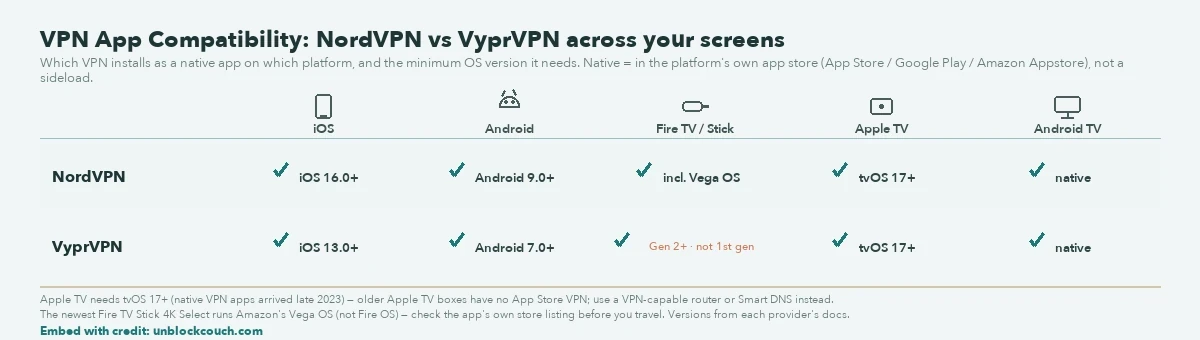
The lesson from a wasted evening in Porto: a VPN's device support is a version-number problem, not a brand problem. Apple TV only got native VPN apps with tvOS 17, so on an older box no app store in the world will help — you're tunnelling through the router or you're not watching. Now I check the tvOS version before I book the place, not after the spinning wheel shows up.
VPN Platform Compatibility Comparison
The table below is the cheat-sheet version — minimum OS versions and native app support for the two VPNs I actually use, checked against each provider's own docs (and, for Apple TV, the App Store listing itself). "Native App" means it's sitting in the platform's own app store — Apple App Store, Google Play Store, Amazon Appstore — not a sideload, not a workaround someone posted in a forum.
| VPN Provider | iOS (Min. Version) | Android (Min. Version) | Fire TV / Stick Support | Apple TV (Native App) | Android TV Support |
|---|---|---|---|---|---|
| NordVPN | 16.0+ [1] | 9.0+ [1] | Yes (incl. Vega OS) [2] | Yes (tvOS 17+) [3] | Yes |
| VyprVPN | 13.0+ [4] | 7.0+ [4] | Yes (Gen 2+, not 1st gen) [4] | Yes (tvOS 17+) [5] | Yes |
Platform-Specific Technical Requirements
- Apple TV (tvOS 17+)
- This one burned me in Porto. We were staying in a fourth-floor Airbnb with an Apple TV bolted to the wall, and I spent a good chunk of one evening trying to get either of my VPNs onto it before I gave up and looked into why — turns out that specific box was old enough that it has no App Store VPN slot at all. Apple only opened native VPN apps to Apple TV with tvOS 17, back in late 2023 [3]. If your Apple TV is the newer HD or 4K model running tvOS 17 or later, both NordVPN and VyprVPN install exactly the way they would on an iPhone [3], [5]. If it's an older first-, second-, or third-generation box — no App Store VPN option, full stop — you're stuck doing it the long way: putting the VPN on the router the Apple TV is plugged into, so the whole network tunnels through it instead of the device itself [6], or using a Smart DNS profile as a lighter, unencrypted workaround just to unblock a show [7]. Neither is a two-minute job in a hotel room with dodgy wifi. Bring a laptop and some patience (and honestly, just check the Apple TV model before you book anything that boasts about its "smart TV setup").
- Amazon Fire TV (Fire OS vs. Vega OS)
- Most Fire TV Sticks — including the battered one a previous guest left behind in our Chiang Mai Airbnb — still run Fire OS, which is basically reskinned Android, so whatever works on your Android phone tends to work here too. The complication is the newest Fire TV Stick 4K Select, which launched in October 2025 running something entirely different: Amazon's own Vega OS, built on Linux instead of Android [8]. NordVPN got there first with a proper Vega OS app; IPVanish followed, and by May 2026 Surfshark had joined them too [2]. Tom's Guide's most recent testing only had NordVPN and IPVanish confirmed [8] — which tells you how fast this specific corner of the market is moving. If you're buying a Vega OS stick for a trip, check the exact VPN's own app store listing before you travel, not after you've landed and the Fire Stick is the only screen in the room.
- Android TV / Google TV
- This is the easy one, and also the one nobody warns you about because it just works. Chromecast with Google TV, the Sony and Hisense sets we've rented in a couple of places, whatever's bolted to the wall in a mid-range hotel room — if it runs Android TV, it opens the Google Play Store like any other Android device, and both VPNs install the normal way. No router, no Smart DNS, no lengthy detour. It's the one category on this whole page where "just search and install" actually means that, and I wish more of this table worked like it.
Where I tested this: Lisbon (NordVPN on iPhone and Apple TV 4K, July 2026), Porto (both VPNs against an older Apple TV, June 2026), Chiang Mai (Fire TV Stick, checking Vega OS support, May 2026).
Last verified: 2026-07-16
Sources
- [1] NordVPN Support: What operating system versions does NordVPN support?
- [2] TechRadar: Surfshark launches native VPN app for Amazon's new Vega OS Fire TV sticks
- [3] Engadget: NordVPN comes to the Apple TV
- [4] VyprVPN Support: What devices are supported by VyprVPN?
- [5] Apple App Store: VyprVPN — VPN Secure & Private (system requirements)
- [6] Surfshark: Apple TV VPN Setup and Compatibility
- [7] NordVPN Support: How to set up NordVPN SmartDNS on Apple TV
- [8] Tom's Guide: Best Fire Stick VPNs